
Getting started
How to get the most out of Jeevrit, and what Jeevrit+ adds
Set up Jeevrit, log Indian meals the way you describe them, use your daily plan and look back on your week. Plus what stays free and what Jeevrit+ adds.
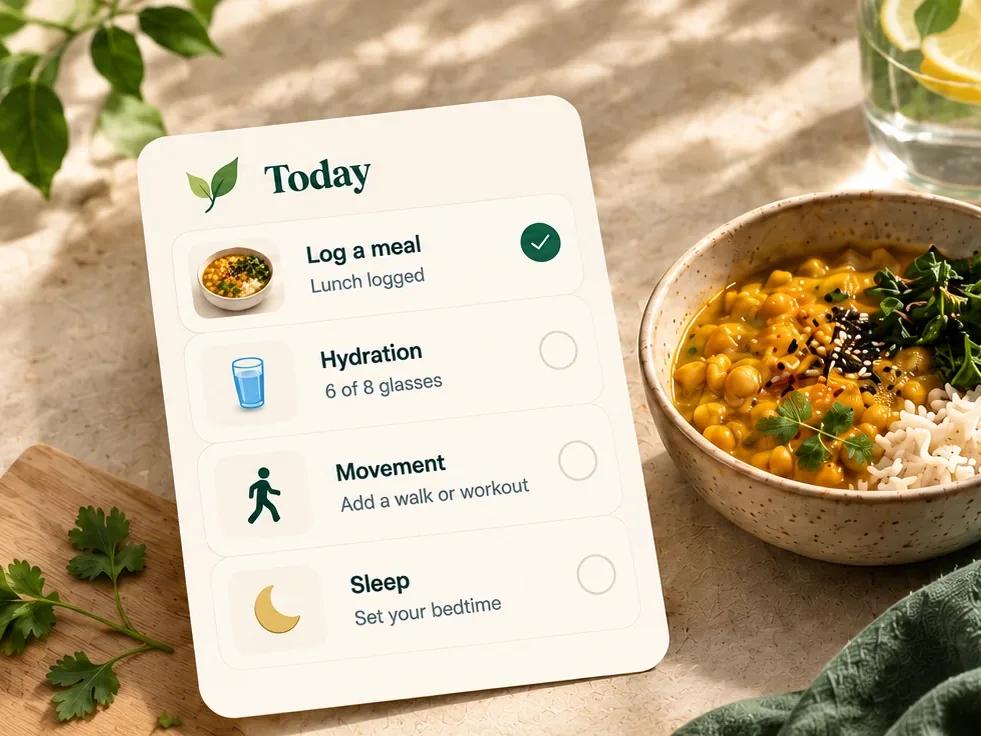
Jeevrit works best when it knows a little about your ordinary week: what you usually eat, how you sleep and what your days look like. You do not need to log everything, every day. A few honest minutes a day are enough for a plan that fits. This guide covers what is worth setting up, the habits that make it useful, what stays free and what Jeevrit+ adds.
Start with answers that sound like you
The first questions shape everything that follows, so they are worth a careful minute.
- How you eat. Choose vegetarian, eggetarian, non-vegetarian, vegan or Jain, and the cuisines you cook at home, so suggestions use food you would actually put on your plate.
- Allergies and sensitivities. Add them once, and suggestions avoid foods that match them.
- Your phone or watch. On Android, Jeevrit can read steps, sleep, water, weight and workouts from Health Connect, which most watches and fitness apps write to. It reads only what you tick and never writes anything back.
You can change your answers later. Your food preferences, for example, live in the You tab.
Log meals the way you would describe them
Search 10,000+ food names and log a meal in the portions you use at home: two rotis, a katori of dal, a bowl of rice, a piece of fish. Household measures are easier to remember than grams. As long as you use your own bowls and spoons the same way each time, one day compares fairly with the next.
- Log close to the meal. Lunch logged at lunchtime is more accurate than lunch remembered at night.
- Log what you ate, not what you meant to eat. An honest ordinary week is worth more than one perfect day.
- Remember the extras: ghee on the roti, a fried papad, sugar in your chai. They add up, and they are the easiest to forget.
- Short on time? Tell Jivi, Jeevrit’s AI guide, “two idlis and sambar for breakfast”, and it can log the meal from your message.
Wondering what a good plate looks like? Read how to build a balanced Indian lunch.
Treat your daily plan as three small nudges
Each day, Today gives you three small actions, built around how you eat and live, and each one comes with the reason it is there. If one does not fit the day you are having, change it rather than ignore it:
- Make it easier swaps it for a lighter action on a busy or tired day.
- Swap replaces it with something that fits better, and lets you say why.
- Skip today sets it aside for the day and asks what got in the way.
Mark what you do as you go. If you tell Jeevrit your area, your plan also watches the air: when it is poor outside, activity moves indoors or to a better time of day. And choose only the reminders you want. Nothing arrives in your quiet hours, except a reply to something you have just asked for.
Add the rest of your day, a tap at a time
Food is only part of the picture. Water, sleep, activity, energy and weight each take a tap or two, or come in from your phone or watch. You do not need all of them. Start with the one or two you care about most, and add more only when they feel easy.
Look back once a week
Your weekly view puts your water, sleep, activity and meals side by side, so patterns are easier to spot: the late dinners before the bad nights, the busy days with no water. Choose one small thing to change for the next week. Our guide to small habits for busy workdays has ideas that fit a packed day.
The journal and private diary are there for everything else. Your diary is yours alone: Jivi never reads it, and it is never used for suggestions.
Keep going on the days that go wrong
A missed day is part of a real week, and Jeevrit is built around that. Comeback shields help you come back after a gap, and a festival day keeps your streak “on the house”. What matters is the next ordinary day, not the one you missed.
Ask Jivi when you are stuck
Jivi answers everyday questions about meals, routines, sleep and the air: what to pack for tomorrow’s tiffin, how to fit a walk into a long day, what to eat after a late meeting. It understands Hindi and Hinglish and replies in the same language. With your permission, it uses what you have logged to make its answers personal. Jivi does not diagnose and does not replace a doctor.
Find Stride and Laya on Today
Jeevrit is three spaces in one app. Stride, for training, has its own card on your Today screen: tap it to set up a home or gym plan. Laya, for your cycle, has a card on Today too, and a place in the You tab. Each works on its own, so use one, two or all three. Start with getting the most out of Stride or getting the most out of Laya.
A simple first week
- Day 1: answer the setup questions and log one meal.
- Days 2 and 3: log your main meals, and follow, swap or skip your three actions.
- Days 4 to 6: add water or sleep, whichever matters more to you.
- Day 7: open your weekly view and choose one thing to keep doing.
What stays free
Everything you need to build the habit is free, and complete: food search and meal logging, water, sleep, activity, energy and weight, a full daily plan every day, your weekly numbers and trends, the journal and private diary, streaks, shields and the garden, air quality, Health Connect, reminders, and downloading or deleting your data. Jivi is free to try, with 7 messages a month.
What Jeevrit+ adds
Jeevrit+ is one subscription for Jeevrit, Stride and Laya. In Jeevrit, it adds:
- Meal photos. Snap your plate, up to five photos a day, and check what Jeevrit found. Nothing is saved until you confirm it.
- Voice logging. Say what you ate, even several meals in one go, with up to 90 minutes a month.
- Much more Jivi. 350 messages a month, and Jivi remembers the preferences you choose.
- A plan built from your own logs. Your daily plan draws on your own meals, sleep and activity, and protein ideas name a dish for today with its protein.
- A calorie target that learns. It is adjusted each week to what your own logs show.
- Reports that explain. Your weekly and monthly reports go beyond the numbers, with a plain-words read of your week and month.
- Today, arranged your way. Add useful cards, hide optional ones and order Today around your routine.
- Your whole history. Free shows your last 30 days. Jeevrit+ opens up everything you have logged since day one, and Year in Bloom looks back on your whole year.
Buying Jeevrit+ does not change any of your sharing choices, and ending it deletes nothing you logged. The app shows the current price, and any free trial, before you subscribe.
This article shares general wellbeing information. It is not medical advice and does not replace a doctor or registered dietitian who knows your health history.
All Jeevrit articlesA little better starts with today.
Log familiar meals in household portions, follow a small daily plan and see your week come together.
Get JeevritFree on Google Play for Android.More from the Jeevrit journal
 Food · 4 min readA balanced lunch with familiar foodA practical plate, built from the foods you already know.Read article
 Sleep · 3 min readAn easier evening wind-downSmall, realistic ways to signal the end of your day.Read article
 Everyday habits · 2 min readSmall habits for busy daysRoutines that have a place in the day you actually have.Read article
 Personalisation · 5 min readYour day, connectedHow food, training and the context you allow come together.Read article